
What you really earn per hour
For coaches, private tutors, trainers and wellbeing practitioners who work by the session, and for freelancers who bill by the day or by the project. Alraune tracks your sessions, your invoices and your time, then tells you what each hour brings in and what to set aside for social contributions and tax.
- 14 days free
- No credit card
- No commitment
- Data in Europe


Two demos, no sign-up needed: a graphic designer · a sports coach
Your real income, after tax and social charges
You mark an invoice as “Paid”: the month's collected total goes up, and you see how much to set aside for contributions and tax. Urssaf means the French social contributions; CFE is the French local tax for business owners.
Animation: an invoice for €1,200.00 goes from “To collect” to “Paid”. The amount collected this month goes from €1,730.00 to €2,930.00, the amount to set aside from €411.17 to €685.97, and what you really keep from €1,086.94 to €2,012.14.
Scenes recreated from the app, with made-up data.
Who is the Freelancer account made for?
You sell your time or your know-how, usually on your own. The contribution estimates follow the French micro-entreprise scheme (a simplified self-employed status).
You work by the session
Your clients come back, sometimes pay in advance, and you note what was done at each appointment.
- Business coach, life coach, career coach
- Private tutor, homework help, language teacher
- Trainer, workshop leader
- Non-medical wellbeing: sophrology, yoga, pilates, relaxation massage, naturopathy
- Music, dance or drawing teacher, personal trainer, sports instructor
You bill by the day or by the project
Quote, deposit, delivery, invoice: you want to know what each job really brought in, revisions included.
- Graphic designer, web designer, illustrator, videographer
- Developer, front-end integrator, project manager
- Consultant in marketing, HR, organisation…
- Copywriter, translator, community manager
- Wedding, portrait or corporate photographer
Also home services, beauty, events or transport: any trade that sells services finds its quotes, invoices and follow-up here.
Who Alraune is not for
- Regulated health professions (doctor, psychologist, physiotherapist, nurse, osteopath…): Alraune does not host health data. See what is not allowed
- Anyone who only wants to make invoices. Free tools do that very well. Alraune is for knowing what you really earn: if that is not your question, you do not need us.
A 10-session pass, a package of hours: you know where each client stands
You sell a prepaid pass or package from the client's sheet. Then, with each session note, Alraune offers to deduct it.
- The balance stays in front of you: “3 sessions left”
- A reminder when the pass is running out, so you can offer the next one
- The invoice for the pass is prepared at the same time
- An expiry date, if you set one
- The total of sessions already paid for that you still have to deliver

Six freelancer questions, six answers with numbers
Plain sentences, worked out from your invoices and the time you log.
“My income changes every month”
Set a monthly goal for revenue and for sessions, consultations or jobs: Alraune gives you the pace to keep until the end of the month.
Example shown in the app9 sessions and €850 to go in 12 working days.
“I spend hours nobody pays for”
Prospecting (finding new clients), admin, revisions, preparation: log them too. Your real hourly rate is the money received divided by all your hours, even the ones nobody pays for. It is worked out client by client and by type of service.
Example shown in the appWith Studio Lumen: €38 real hourly rate · your average: €52
“One client is almost half of my revenue”
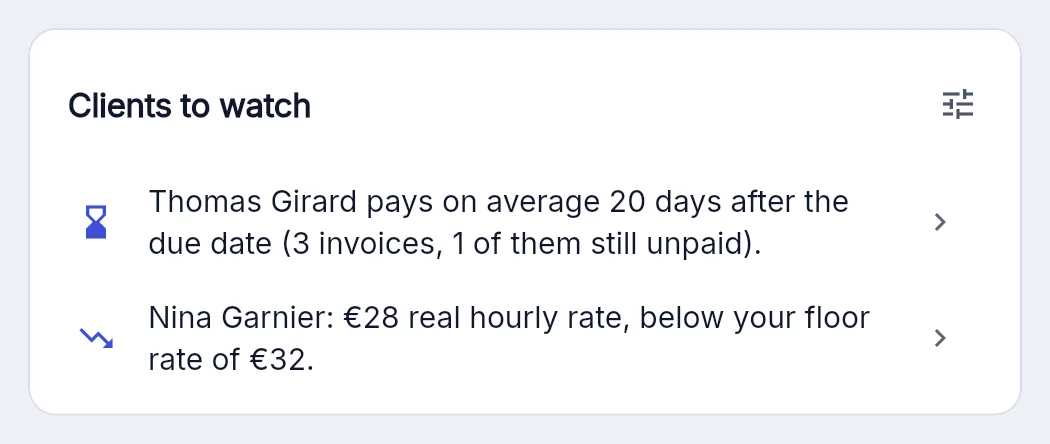
“Clients to watch” points out the client who weighs too much, the one who pays late and those who bring in less than your floor rate (the rate below which you stop earning what you aim for). These are observations: what you do next is up to you.
Example shown in the appAtelier Morel accounts for 46% of your revenue over the last 12 months.
“I get paid late and I hate chasing”
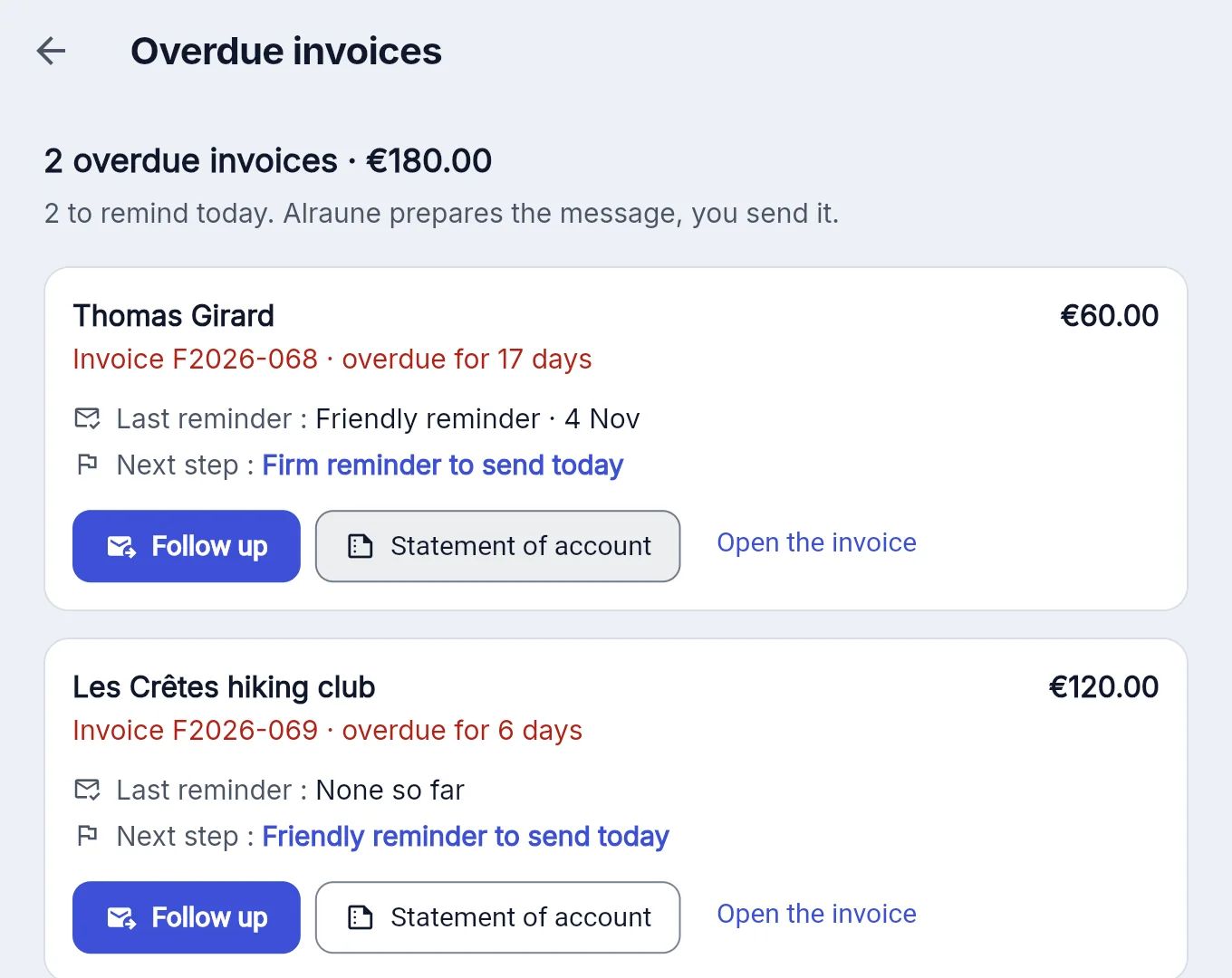
A bank transfer QR code on the invoice: your client scans it with their banking app. Then payment reminders in three tones, from a simple nudge to a courteous formal notice (a formal letter that sets a last deadline to pay): you reread, you send from your own mailbox, and the “Overdue invoices” view keeps the history.
Example shown in the appAtelier Morel pays on average 18 days after the due date (6 invoices).
“Contributions catch me off guard at every return”
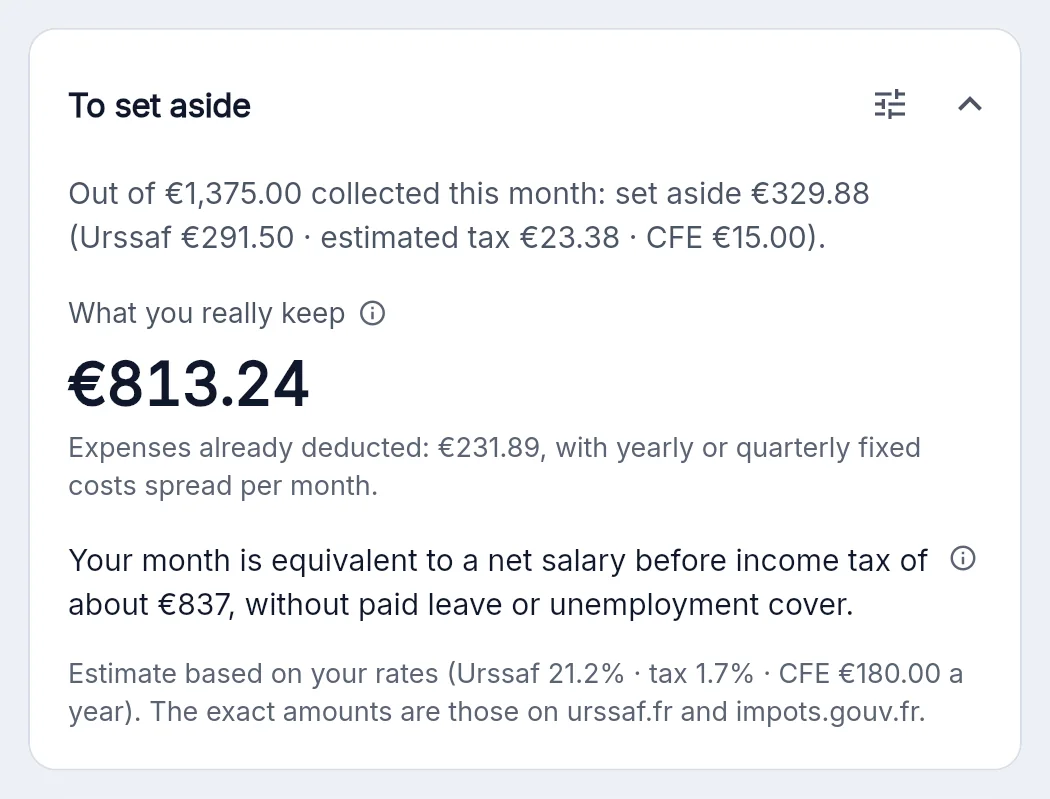
“To set aside” separates, within what you collect, what will go to Urssaf contributions (the French social contributions), income tax and the CFE (the French local tax for business owners). “What you really keep” does the sum, expenses deducted. These are estimates, based on your own rates.
Example shown in the appOut of €2,400 collected this month: set aside €570 (Urssaf €509 · estimated tax €41 · CFE €20).
“Am I charging enough?”
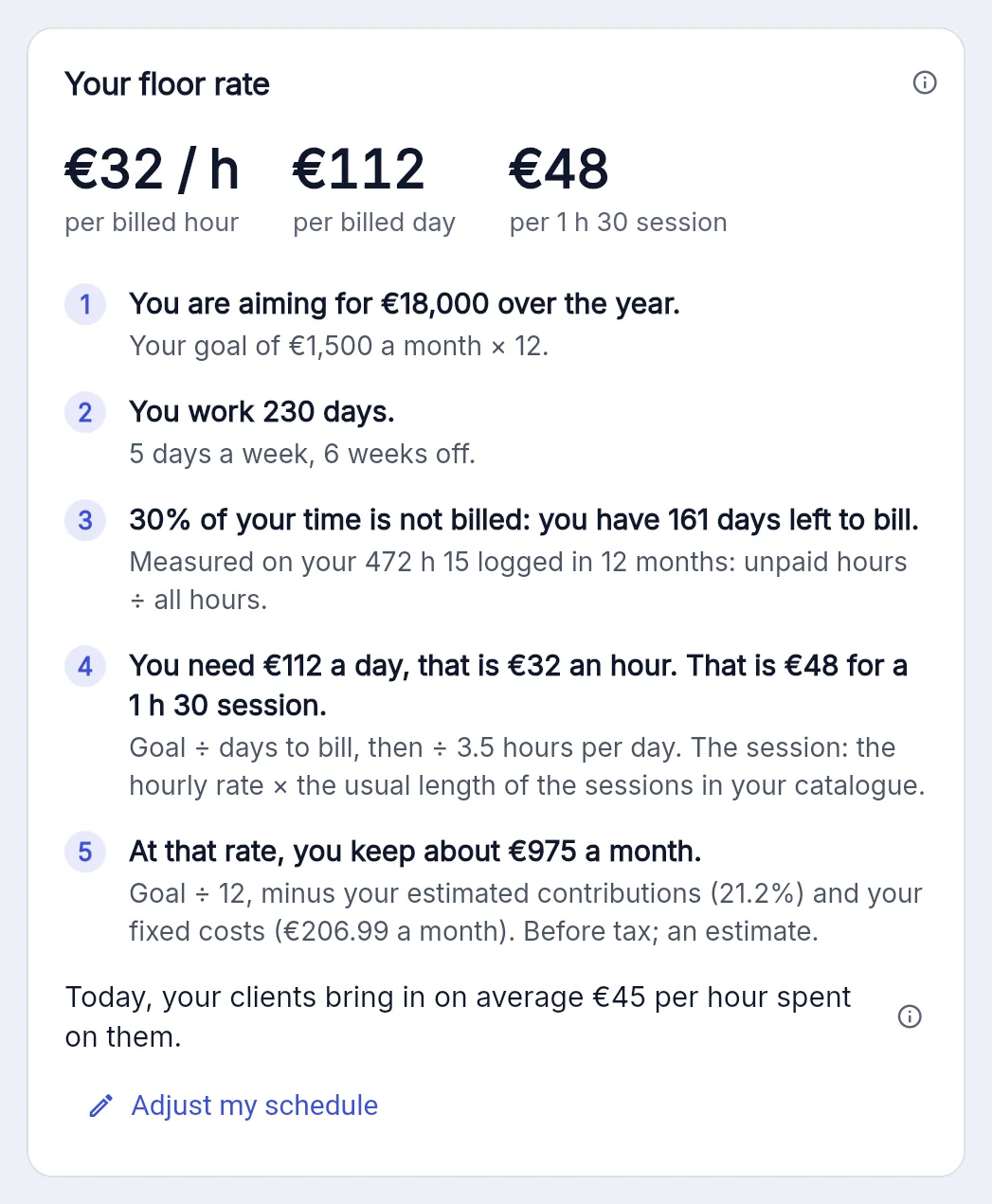
Your floor rate is explained in five steps: your goal, the days you really work, your share of unpaid time, the rate you need, what you keep. A simulator also puts a figure on a price rise, lost clients included.
Example shown in the appThe rate you need per day, per hour and per session, worked out from your own figures.
Amounts are examples. Contributions, tax and CFE are estimates for the French micro-entreprise scheme, calculated with the rates you enter: Alraune does not replace Urssaf, the tax office or an accountant.
Example with made-up data and the French rules (Urssaf…). In your country, you enter your own tax rules in Settings → My tax rules.
What you do with Alraune
Everything is included in the Freelancer account. The extras beyond the basic menu are switched on in the settings, at no extra cost.
Sell and invoice
- Quotes, invoices and credit notes numbered when issued, with no gaps
- Invoice dated the day it is issued, then locked: a credit note cancels it
- Service catalogue: price, unit and usual duration fill in the line
- Deposits deducted from the final invoice
- Invoices repeated every month, quotes duplicated in one click
- PDF in your colour with your logo, French mandatory mentions included
- Document language chosen for each client
- The mention “SIREN en cours d'attribution” if you have just registered in France (the SIREN is the French identity number of your business)
- Record a payment received without an invoice, if you invoice with another tool
- Not an approved platform for French e-invoicing: you prepare your invoices as PDFs
Sessions and packages
- Prepaid passes and packages, sold from the client's sheet
- Visible balance: “3 sessions left”
- Deduction offered with each session note
- Reminder when the pass is nearly empty or expires
- Session notes: what was done, what is planned, the next appointment
- Goals for the month: revenue and number of sessions, consultations or jobs
Get paid
- Bank transfer QR code on the invoice: your client scans it with their banking app
- Your own payment link, printed as “Pay online”
- Alraune collects nothing and takes no commission
- Payment reminders in three tones, with their history
- “The client promised to pay on…”: the reminder waits
- “Overdue invoices” view: who to chase today
- Client statement of account as a PDF
What you really earn
- Real hourly rate, unpaid time included
- Profitability per client and per type of service
- “Clients to watch”: dependency, late payers, clients below your floor
- “To set aside”: Urssaf, estimated tax, CFE
- Reduced start-up rate (the French ACRE, a reduction in contributions during your first year) taken into account
- “What you really keep”, and its net-salary equivalent
- Floor rate explained in five steps: per hour, per day and per session
- Price-rise simulator
- A dashboard you arrange yourself: move, hide or collapse its blocks
Your time
- Timer: it keeps running even if you close the tab
- Billable or non-billable time, logged by type
- Billable time turned into an invoice
- Timesheet per client and per month, as PDF or Excel
- Calendar with filters; you add it to Google, Outlook or Apple with a link you paste once
- Sessions in the calendar: linked to a client and a service, repeated every week if you like
- Yearly goal and capacity: days billed, days left to sell module to switch on
Your clients and prospects
- Client sheet: contact details, tags, full history
- Client list imported from a spreadsheet
- Prospects followed step by step, follow-ups in the calendar
- Documents and letterhead, exported to Word or PDF
- Expenses and mileage advanced for a client, rebilled in one click module to switch on
Your obligations
- Amount to declare to Urssaf and the deadline, for a micro-entreprise
- French VAT-exemption threshold tracked (while your turnover stays under it, you charge no VAT), with an alert
- Expenses, receipts and fixed costs: room, phone, insurance…
- Export for your accountant, invoice PDFs included
- Backup of your data
- 8 languages, in the browser, on phone and computer
The extras beyond the basic menu (“Expenses and mileage”, “Goals and capacity”, “Equipment”) are included in your account: you switch them on in the settings, at no cost. See the extras you can switch on
The Freelancer account, screen by screen
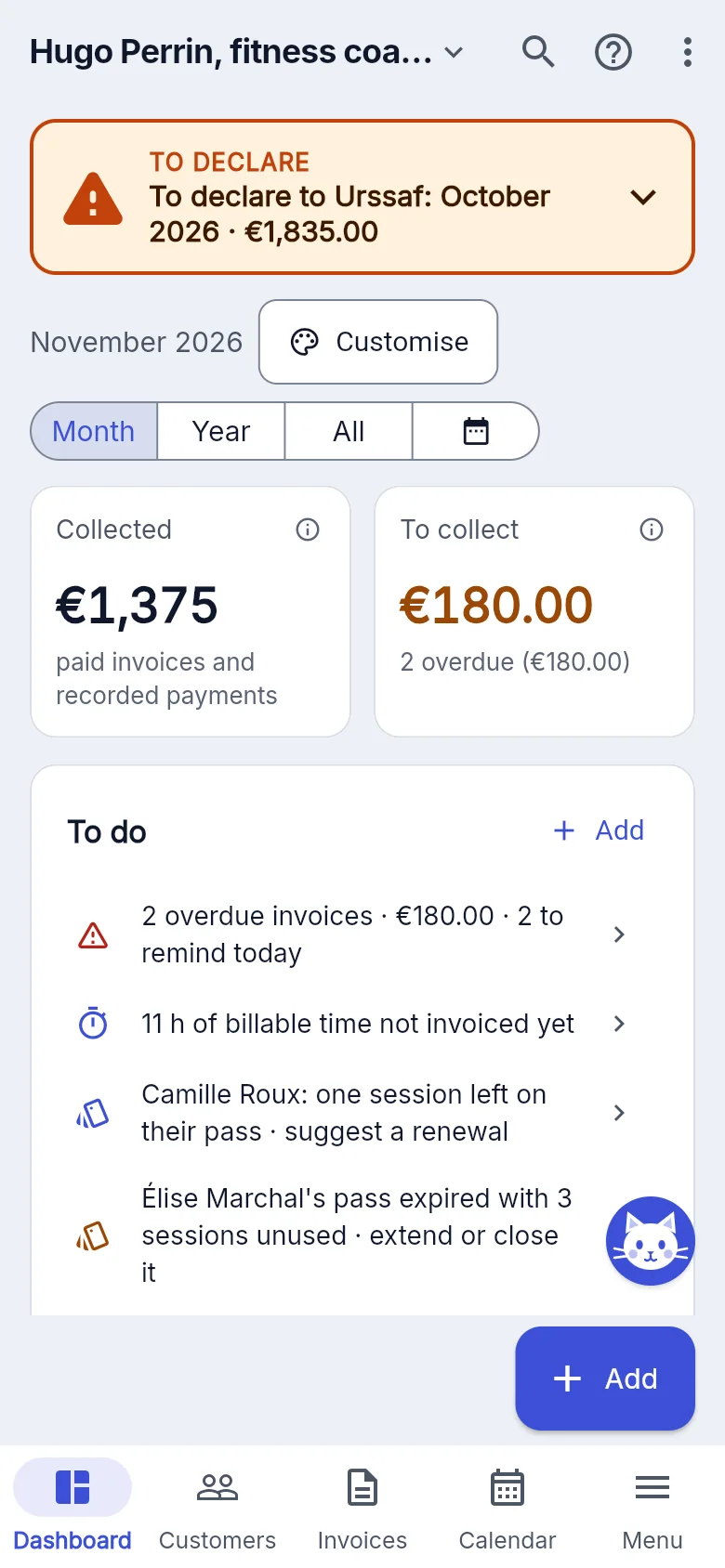
Screenshots of both demos: an imaginary graphic designer, her regular clients and her projects; a sports coach and his sessions.
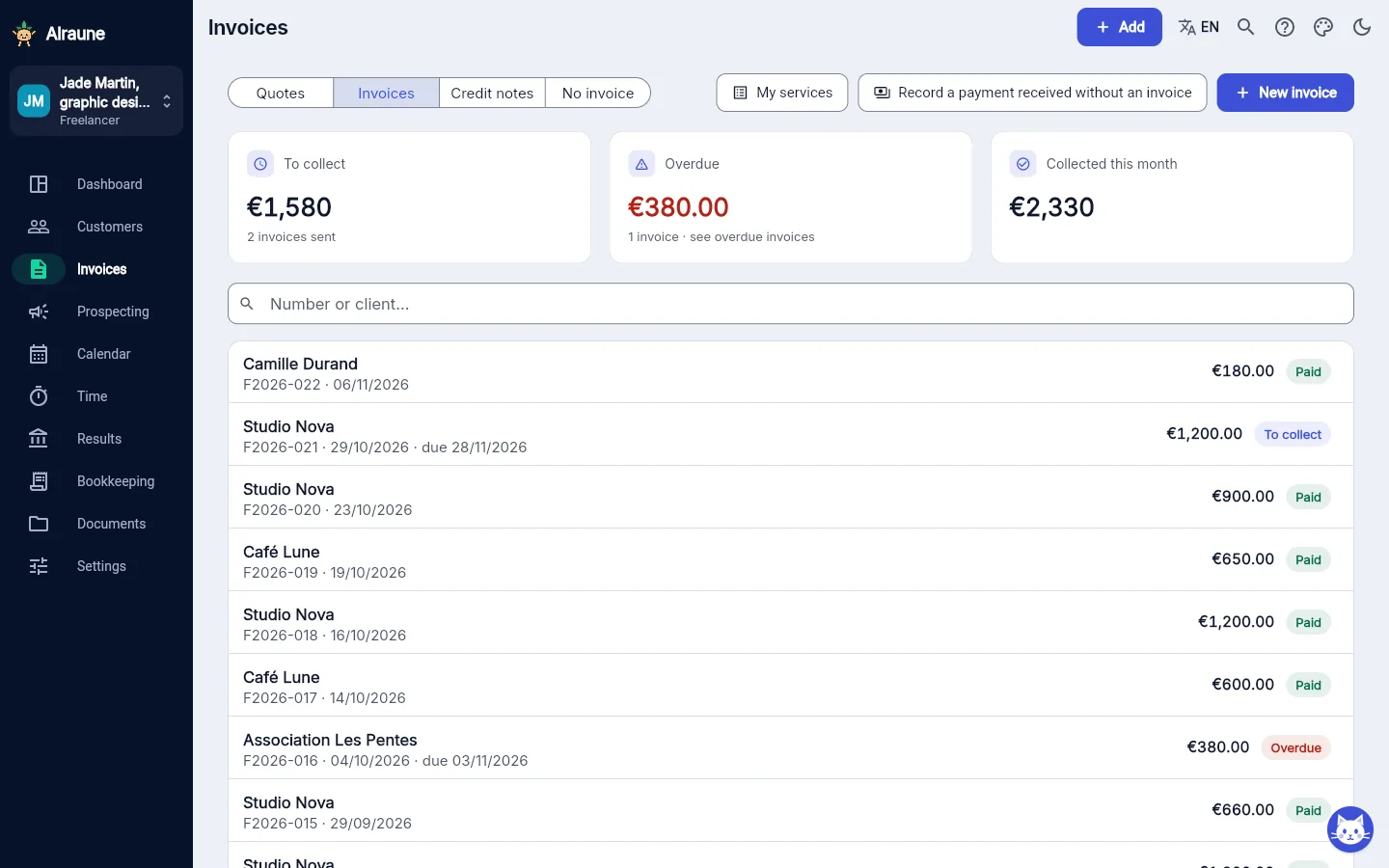
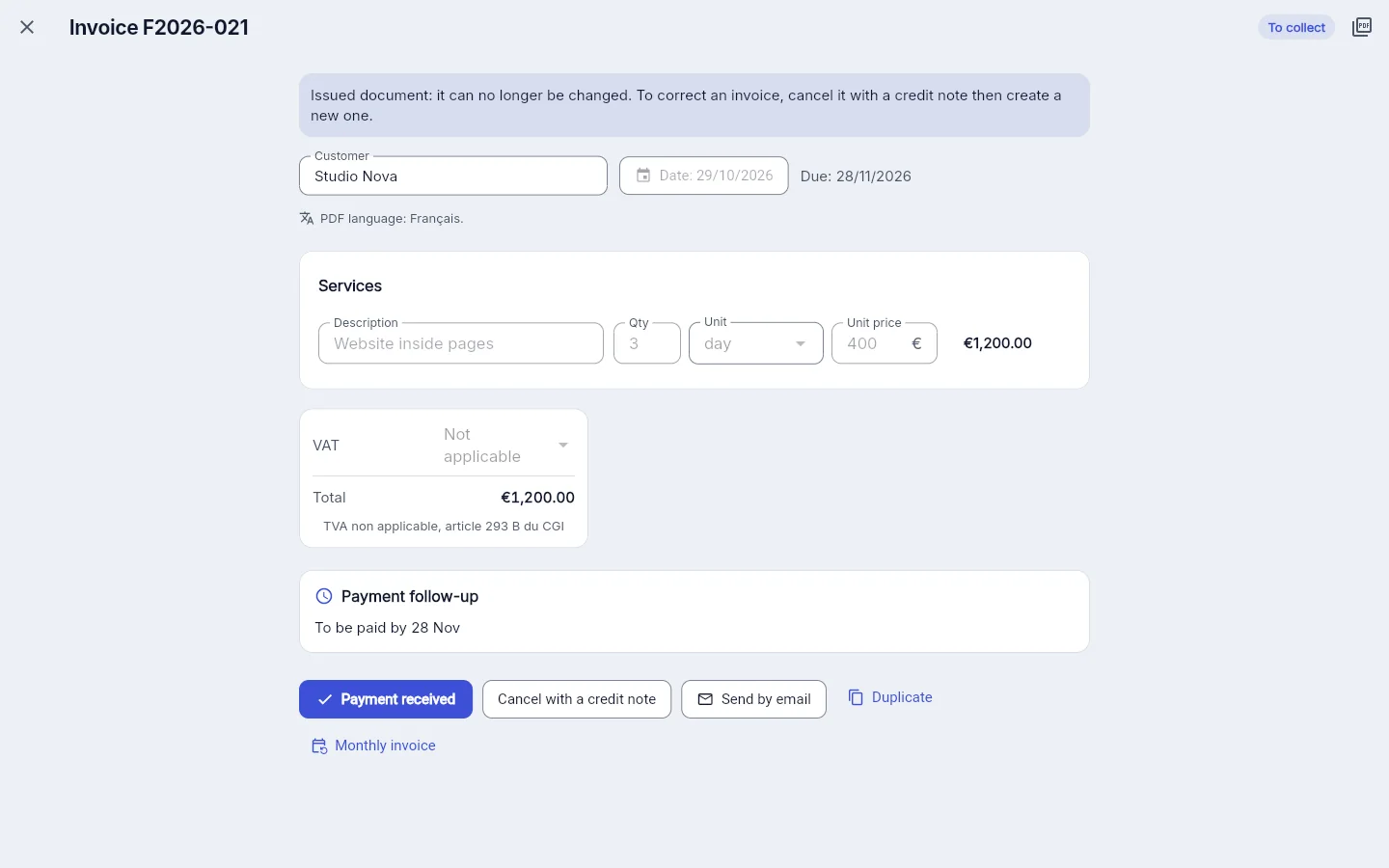
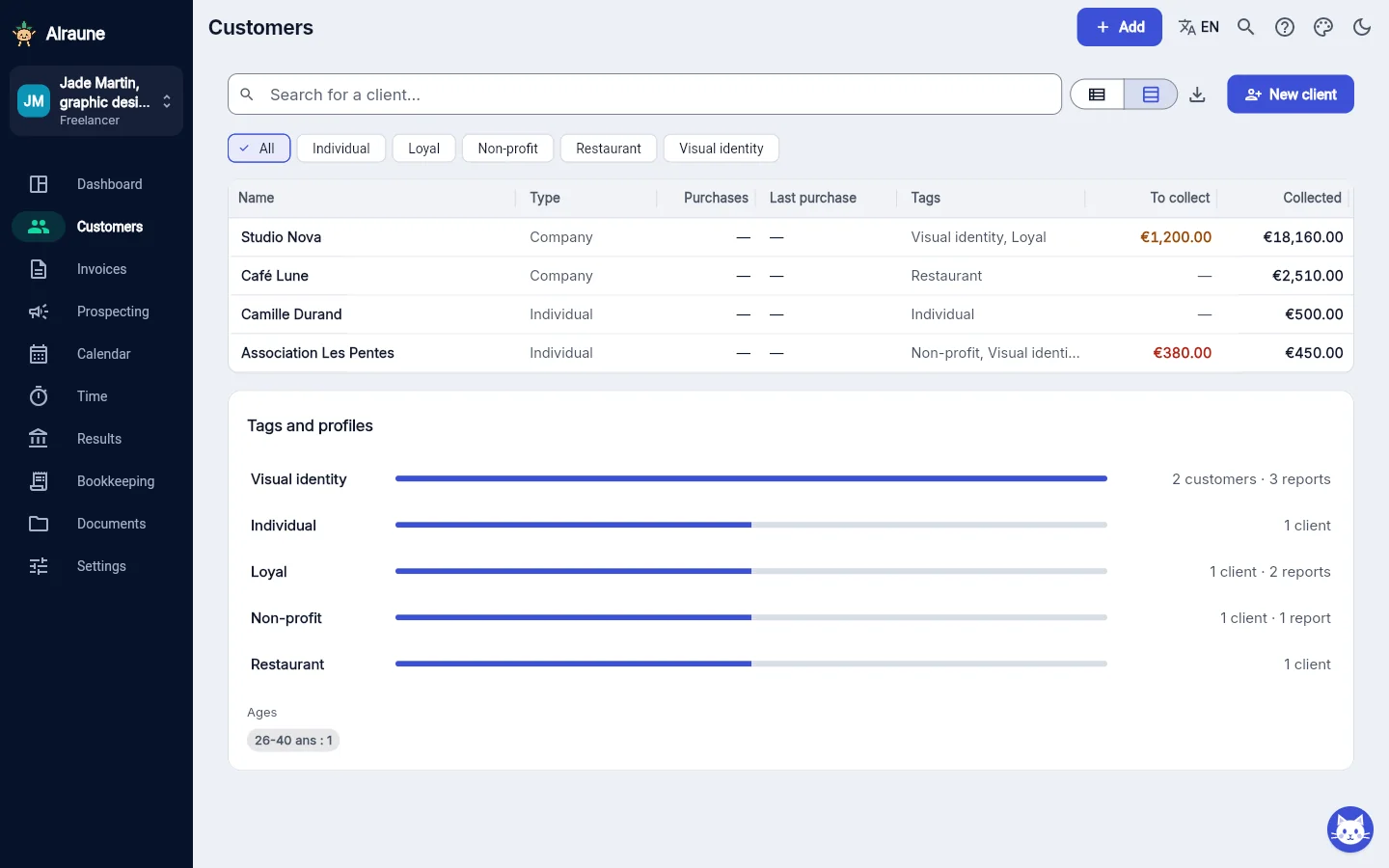

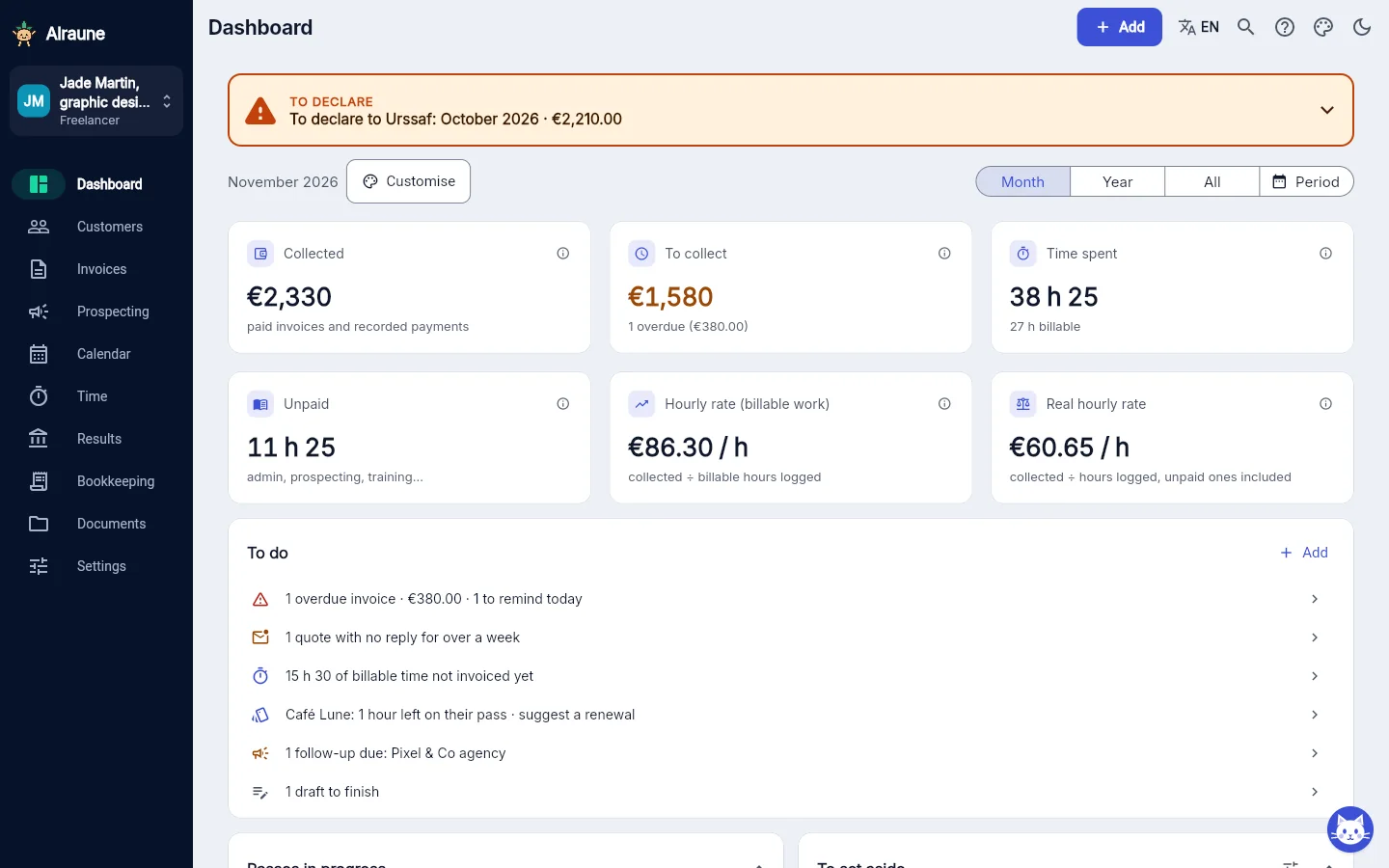

Why pay €9.99 when invoicing is free elsewhere?
Fair question. Nobody pays to make invoices, and that is not what we are selling you.
What a free invoicing tool does well
- Quotes and invoices with the mandatory mentions
- Continuous numbering
- Sending to the client
- Tracking what is paid and what is not
If that is all you need, keep it: you do not need Alraune.
What an invoice does not tell you
- What you earn per hour, once the time nobody pays for is counted
- Which client pays off, and which one costs you
- What, in the money you collected, is not yours
- The rate below which you miss your goal
- Where each client's session pass stands
Invoicing records what you sold. It does not say whether you can live on it.
What Alraune adds
- Sessions, prepaid passes and packages
- Real hourly rate per client and per service
- “To set aside” and “What you really keep”
- Floor rate and price-rise simulator
- “Clients to watch” and payment reminders
Invoices are included. Would you rather keep your invoicing tool? Just record the payments you receive: all these figures are worked out from them. A recorded payment is not an invoice.
- €9.99 a month
- or €99.90 a year: pay 10 months, get 12
- 14-day trial, no credit card
- No commitment
Simple to use, one step at a time
What you do most often with the Freelancer account, and what it takes.
From quote to invoice in one tap
On a quote you have sent, “Accepted: create the invoice” copies the client and the lines into an invoice for you to read through. A deposit you already invoiced is deducted.
Your field first
When you start, you pick your field: its typical services are offered for your catalogue, quotes and invoices.
One first step at a time
The “Getting started” list suggests what comes next: add your first client, make your first quote or invoice. It ticks itself.
A client file?
Import it from a CSV file: no need to retype your clients by hand.
Questions freelancers ask
Is Alraune an approved e-invoicing platform?
No. Alraune is not an approved platform: you prepare quotes and invoices as PDFs, with the French mandatory mentions. In France, micro-entreprises will have to issue their business-to-business invoices electronically from 1 September 2027: from that date, issuing will go through the approved platform of your choice.
Can I keep my current invoicing tool?
Yes. Keep invoicing with your tool and just record the payments you receive in Alraune: the client, the amount, the date. The collected amount, the real hourly rate, “To set aside”, profitability per client and the amount to declare to Urssaf are worked out from them, just as with a paid invoice. A recorded payment is not an invoice: keep the one you issued elsewhere. Sessions, prepaid passes, time tracking, the calendar and prospects also work without invoices.
Where is my clients' data?
It is hosted in Europe, in a private space: nobody else sees your clients, your invoices or your session notes. You can export everything. You can also delete your account at any time. On security: your password has at least 10 characters. “Log out of all devices” closes your account everywhere in one tap. A new public calendar link shows only your clients' initials by default. Session notes are for recording how a session went and its goals, never health data.
I am just starting out: is it useful right away?
Yes. In France, your invoices can carry the mention “SIREN en cours d'attribution” while you wait for your number (the SIREN is the French identity number of your business). If you benefit from the reduced start-up rate (ACRE, a French reduction in contributions during your first year), you enter your rate and its end date: “To set aside” takes it into account, then switches back to the normal rate by itself. It is an estimate, not an official calculation. The Getting started with Alraune guide takes you step by step, from your account to your first quote.
I am not a French micro-entreprise: does it still work?
Quotes, invoices, sessions, time tracking, profitability per client and the floor rate work whatever your status. Outside the micro-entreprise scheme, however, your contributions and tax depend on your profit: Alraune does not estimate them and tells you so clearly, rather than making up a figure.
I am a health professional: can I use it?
No. Alraune is not a certified host for health data: regulated health professions are not accepted. Non-medical wellbeing (sophrology, yoga, relaxation massage…) is welcome, without recording any health data. What is not allowed
My clients are already in a spreadsheet: do I lose everything?
No. Your client list imports from a CSV file (Settings → Backup and data → “Import clients (CSV)”); clients already there, with the same name or the same email, are skipped. Your old invoices stay in your old tool: if you keep invoicing there, just record the payments you receive. Getting started with Alraune
Guides in French, based on French rules: working out your day rate · what an invoice must contain · e-invoicing for micro-entreprises
What is not allowed
Alraune is not a certified host for health data (the French HDS certification). The Freelancer account is therefore not intended for health professions or for recording health data:
- Professions not accepted: doctors, psychologists, psychotherapists, psychiatrists, dentists, physiotherapists, nurses, midwives, speech therapists, osteopaths, chiropractors, dietitians, podiatrists, pharmacists, and more broadly any prevention, diagnosis or care activity.
- Data that is forbidden, whatever your trade: diagnoses, symptoms, treatments, medical history, psychological or therapeutic follow-up, prescriptions, test results.
Non-medical wellbeing practitioners (sophrologists, naturopaths, hypnotherapists…) are welcome, as are coaches, trainers and yoga teachers: session notes are for recording how the session went, the exercises suggested and the goals, never information about your clients' health or sex life. See article 3 of the terms and conditions.
See what you really earn, starting this month
Create your account and log your first invoices and your first hours. Or open a demo, a graphic designer's or a sports coach's: you can click everywhere and nothing is saved.
14 days free, no credit card, no commitment