
Makers, artists: the real cost of your creations
Jewellery, candles, sewing, ceramics, illustration, painting: Alraune works out what each piece costs you, what you earn per hour, tracks your materials and warns you before you run out.
- 14-day free trial
- No credit card
- Data hosted in Europe

What you really earn on every piece you make
Your cost price is materials and other costs: your time is not an expense. You type in your price and see what you earn per piece and what you earn per hour. The price is yours to set.
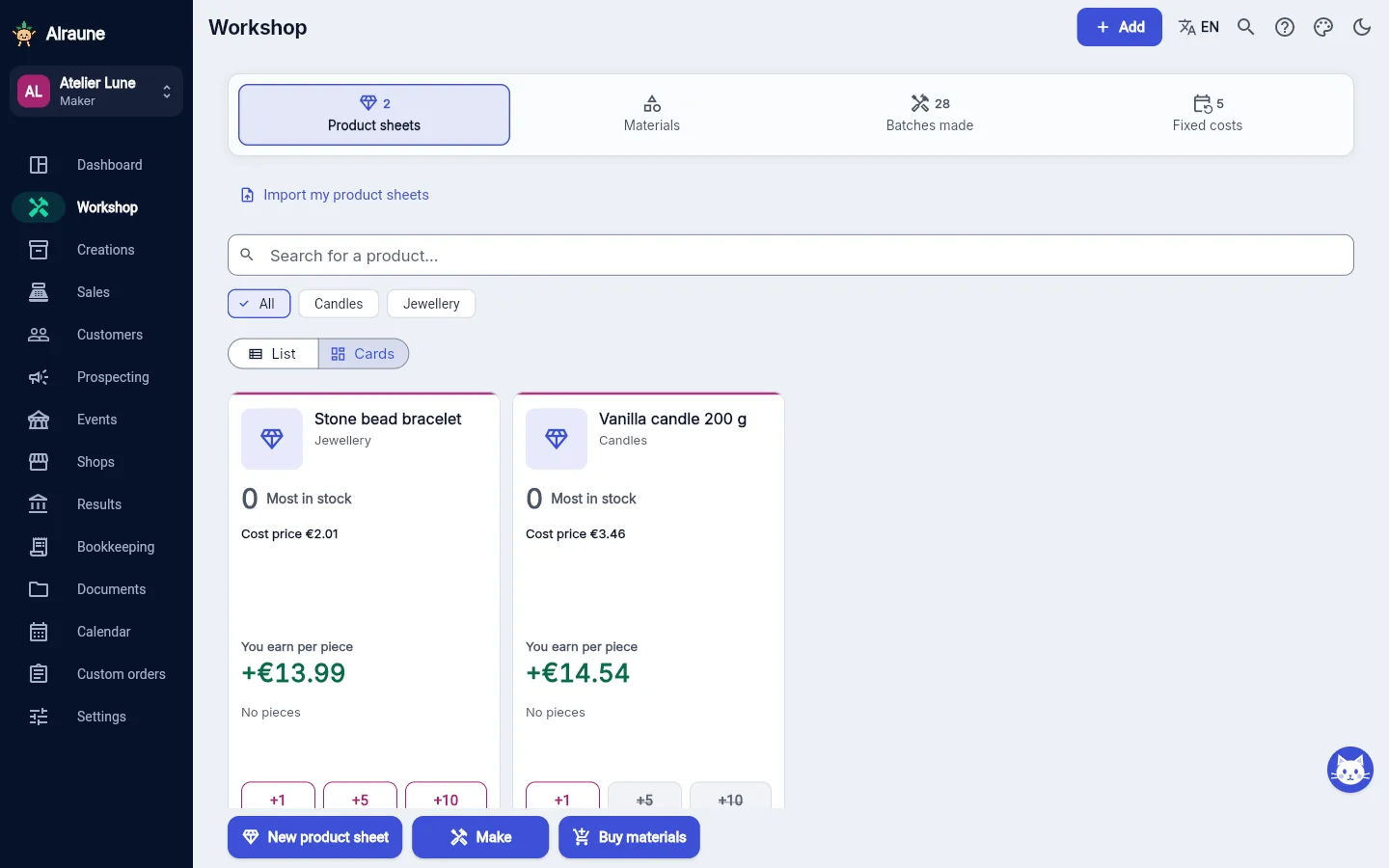
Animation: a candle costs €3.46 in materials, a cost price of €3.46 (the 16 minutes of work are noted separately, not as a cost). At the selling price chosen by the maker, €18.00, it earns €14.54 per piece, or €54.53 per hour.
Scenes recreated from the app, with made-up data.
The Maker account, screen by screen
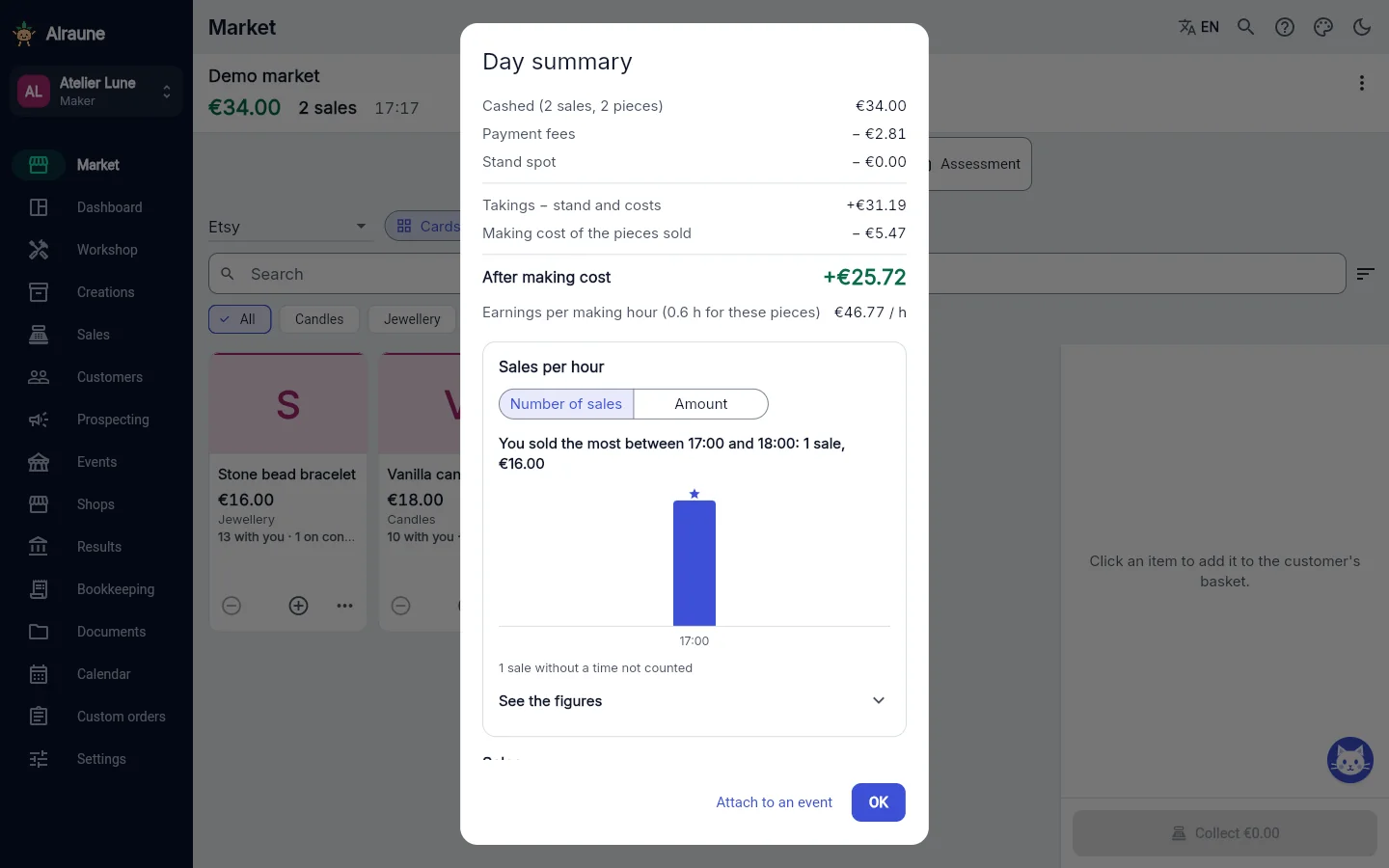
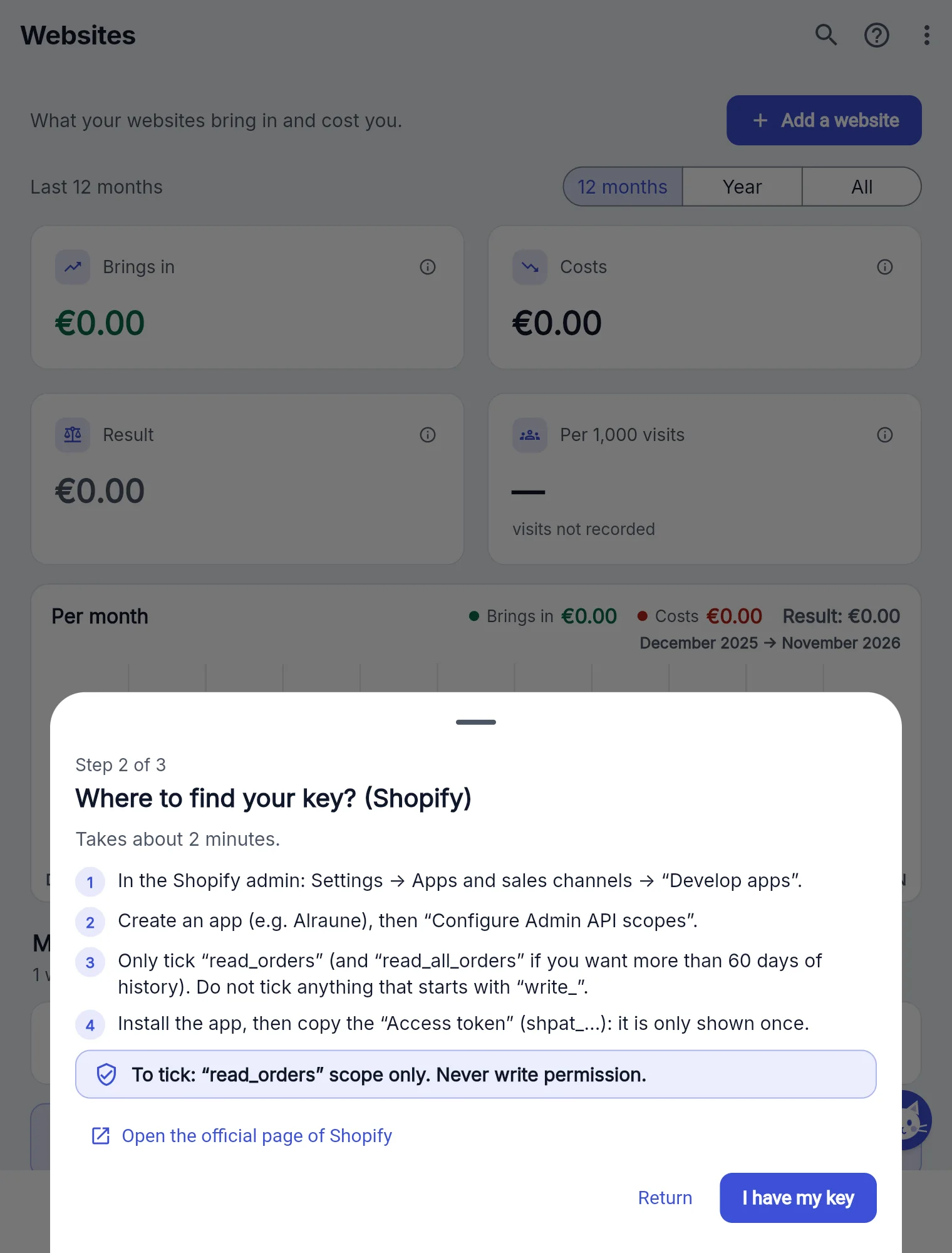
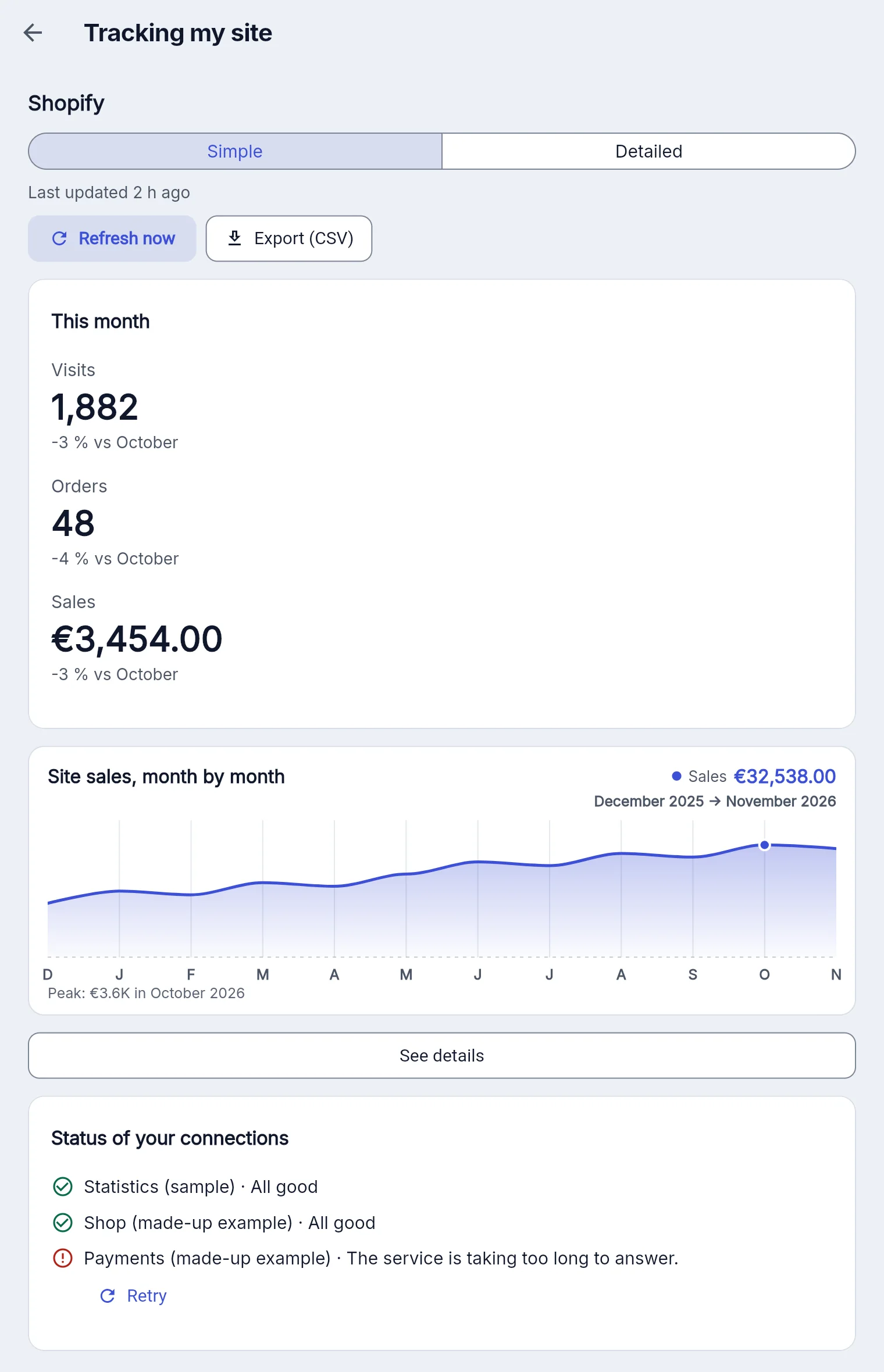
Screenshots of the demo: an imaginary candle and jewellery workshop with a year of trading.




Example with made-up data and the French rules (Urssaf…). In your country, you enter your own tax rules in Settings → My tax rules.
Business software for artisans and independent artists
The Maker account is for anyone who makes what they sell, in batches or as one-of-a-kind pieces.
You are a craftsperson
You work a material and sell your pieces online, at markets or in shops: you want to know their real cost price.
- Jewellery making
- Ceramics, pottery
- Sewing, leatherwork, knitting and crochet
- Candles, soap, home fragrance
- Woodwork, stationery, 3D printing
You are an artist
You sell your artworks, prints or commissions: you want to know what each one cost you and what it earned.
- Painting, illustration
- Sculpture, printmaking
- Art prints, posters, cards
- Portraits and commissioned work
- Artists who also run workshops or classes
Materials, time, cost price, sales and markets: tracking works whatever your legal status.
Your clients, and what they ordered from you
On a sale, the client is optional: if you enter one, the sale is filed in their record. Records can also be created from the sales you have already logged. Each one shows what the client bought, their average basket (what they spend on average per order) and “Your margin”: what their purchases earned you.
A custom order moves through its steps: requested, being made, ready, delivered. The deposit counts in your revenue on the day you receive it, and delivery only adds the balance. An order of several pieces is delivered at their real cost price. The promised date appears in the calendar, and the order on the client record.

Built for makers, artisans and artists
From raw materials to the sale, without a calculator.
Your materials, tracked
Unit cost kept at purchase, usage deducted with each batch, an alert before you run out.
The true cost of each piece
Materials used and other costs: your cost price is what you spent (materials, costs). Your time is not counted in it, because you don't pay yourself a salary. The time spent is used to work out what you earn per hour. You set the price yourself, based on your market: the product sheet shows what you earn per piece, your margin and your hourly earnings, and warns you if you are selling at a loss or at cost. Your recipes are saved for the next batch.
Your real hourly earnings
The same piece can earn a lot or a little per hour, depending on the time it takes. The dashboard shows you which, over any period.
Custom orders
What the client wants, the deposit received, the promised date. On delivery, the sale is recorded automatically.
A sheet for every creation
Photo, description, range, materials used, making, design and drying time… plus your own sections, collapsible.
Cuts and weights
A one-metre chain cut into 50 cm pieces, 12 g of wax per candle: every portion has its cost, counted in the cost price.
Consignment shops
Pieces left, commission, rent, sales paid in cash or by card and what each shop still owes you, with a restock alert per shop and per piece.
Markets: the real profit
Mileage, meals, accommodation, tolls, stand: what each event cost, earned and made per day. It also lands in your calendar. On the day it is one single path: the till is attached to the event, the stand is counted once, and the "Day summary" appears when you close.
The extras beyond the basic menu are included in your account: "Equipment", "Production planner" and "Workshops and classes". You switch them on in the settings, at no cost. See the extras you can switch on
€7.99 a month, our cheapest account
When you start out, every euro counts: materials, the market stall, platform fees. A business tool should not cost as much as a supplies order.
That is why the Maker account is our cheapest account: you can use it from your very first sales and keep it as you grow. Everything is included.
Maker
or €79.90 a year, 2 months free
- 14-day free trial
- No credit card
- No commitment
- Everything included
Simple to use, one step at a time
What you do most often with the Maker account, and what it takes.
Making: 3 taps
“Make”, your product, then “Make” with the quantity. The product sheet already fills in the materials, the time, the price and the quantity: you only change what has moved.
A material running short?
The app tells you before it saves: you change the quantity, or you make it anyway.
First time? “New product”
You create the product sheet (materials, time, price), then go straight on to making it. Next time, everything is already filled in.
Your price, your choice
Each product shows as a card with its cost price and what you earn per piece, at the price you chose. The app does not suggest any selling price.
Questions from makers and artists
I'm just starting out: where do I begin in the app?
Choose “Maker” and enter what an hour of your work is worth. Then record your materials (Workshop → “Buy materials”), followed by “Make” → “New product”: you create its product sheet, your cost price appears, and next time you just tap the product. The selling price is yours to choose. Getting started with Alraune
I don't know my platform's fees: is that a problem?
No. Leave 0 when you add the platform and fill it in later: a “Platform fees to check” reminder will prompt you, and the fees can still be changed on each sale. Yours are shown in your account on the platform; the values suggested by default are only a guide. Everything is set in Sales → Platforms, with a worked example that shows what you get. At a market or when you sell in person, there are no platform fees.
I already use a spreadsheet: do I lose everything?
No. Your past sales import from your Excel, LibreOffice or CSV file: columns are recognised, a summary shows before you confirm, and the import can be undone in one go if you made a mistake. The sales keep their date and count in your results. If the file has no cost, their margin is marked “unknown cost”. Importing your spreadsheet, step by step
Do my photos take up a lot of space?
Very little: every photo you add is shrunk automatically, sharp and readable, and its GPS location is removed. In Settings → Backup and data, “File storage” shows how much you're using and lightens older photos in one tap.
Explore the demo workshop
The Maker demo follows a candle and jewellery workshop over a year. Nothing is saved.
14 days free, no credit card